Custom Web Application Development
Custom Web Application Development: What It Actually Costs and How Long It Takes
If you've started researching custom web application development, you've probably noticed the same unhelpful answer everywhere: "it depends." That's technically true, but it's not useful when you're trying to budget a project or explain timelines to stakeholders. This guide breaks down the actual cost ranges, the factors that move them, and realistic timelines for different types of custom web apps.
What counts as a "custom web application"
Before the numbers, a quick distinction worth making. A custom web application is different from a website or a custom CMS build it typically involves user accounts, business logic, data processing, and often integrations with other systems (payment processors, CRMs, internal tools). Examples: internal operations dashboards, customer portals, booking and scheduling systems, SaaS products, and workflow automation tools.
If what you actually need is a marketing site with a flexible content structure, that's a custom CMS project, not a web application and it follows a different cost and timeline curve.
What drives the cost
Four factors explain most of the variation you'll see between quotes:
Scope and feature count. A single-purpose tool (say, an internal approval workflow) costs far less than a multi-role platform with dashboards, permissions, and reporting. Every additional user role, every integration, and every custom workflow adds development and testing time.
Integrations. Connecting to a CRM, payment gateway, or third-party API is rarely "just an API call." It usually means handling authentication, error states, rate limits, and data syncing and each integration adds real time, especially if the third-party documentation is poor or the API is unstable.
Data complexity. An app that stores simple records is much cheaper to build than one handling complex relationships, historical versioning, or large-scale data processing. This is often underestimated at the quoting stage and shows up later as scope creep.
Design and UX depth. A functional internal tool with minimal design polish costs less than a customer-facing product where onboarding, responsiveness, and visual design directly affect adoption and conversion.
Realistic cost ranges
These are broad ranges actual quotes depend heavily on the agency, region, and the four factors above but they reflect what most custom builds fall into:
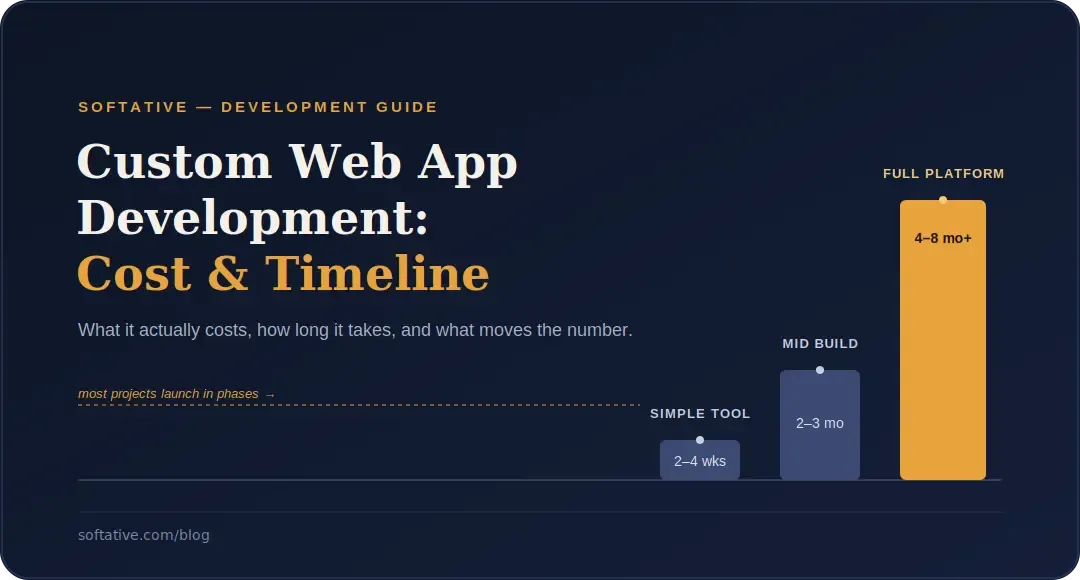
- Simple internal tool or single-workflow app: typically the lower end of custom development, often completed in a matter of weeks
- Mid-complexity app with multiple user roles and one or two integrations: a meaningfully larger investment, usually spanning a couple of months
- Full platform or SaaS-grade product with multiple integrations, complex permissions, and ongoing scalability needs: the largest investment, often built in phases over several months
If a quote comes in dramatically below these ranges, it's worth asking what's being cut usually testing, documentation, or post-launch support.
Realistic timelines
Timelines follow the same logic as cost, but it's worth separating out the phases, since "how long will it take" usually really means "when do I have something usable":
- Discovery and scoping: clarifying requirements, mapping user flows, and defining what's in v1 versus later phases. Skipping this is the single biggest cause of blown timelines later.
- Design: wireframes and UI design for the core flows, done in parallel with technical planning where possible.
- Development: the bulk of the timeline, usually built in sprints with visible progress at each stage rather than a single "reveal" at the end.
- Testing and QA: functional testing, edge cases, and integration testing; more complex apps need proportionally more time here, not less.
- Launch and stabilization: a short post-launch period to fix issues that only show up under real usage.
A simple tool can realistically go from kickoff to launch in a few weeks. A full platform build is more often measured in months, particularly if it launches in phases rather than all at once which, for most businesses, is the smarter approach anyway since it gets a usable product into users' hands sooner and lets later phases be shaped by real feedback.
Why phased development usually beats "build it all at once"
Trying to spec and build every feature before launch is one of the most common reasons custom web app projects run over budget and over time. Requirements shift once real users start interacting with the product phased development gets a working core into use faster, and directs later budget toward what's actually needed rather than what was guessed at the start.
Questions worth asking before you get a quote
- What's the minimum feature set needed to launch something useful, versus what can come in phase two?
- Which integrations are must-haves at launch, and which can wait?
- Who owns the app after launch is ongoing support and iteration included, or is this a one-time build?
- How will requirements changes mid-project be handled, and what does that do to cost and timeline?
Getting clear answers to these before development starts is what separates projects that land close to their original estimate from ones that don't.
Wrapping up
Custom web application costs and timelines vary because the work itself varies scope, integrations, data complexity, and design depth all shift the number meaningfully. The most reliable way to get an accurate estimate isn't a generic price list, it's a scoping conversation that maps your specific requirements against these factors before committing to a number.
If you're looking to build your custom web app contact us we will help you
Written by Yash Patel